

Once you realize that you urgently need SEO optimization. You decide to find either an SEO specialist or seek the services of agencies that provide such services. But how do you know if all those who follow you are following all the steps? We have compiled a list of 14 important steps in SEO promotion. These steps must be followed by everyone in order for your site to rank successfully on search engines. These steps are relevant in any country, for most search engines and sites.
ANALYSIS OF NICHE AND COMPETITORS
The priority for any site is the analysis of a niche and competitors. This is important for estimating the cost of the project and the timing of the site in the TOP. In niche analysis, it is important to assess the quality and number of external links, the number of pages in the index, search traffic, the semantic core, and the geodependence of the niche and competitors. Usually such an analysis is presented in the form of a presentation with oral comments.
SEMANTIC CORE
The specialist who optimizes your site should compile or, if available, update your semantic core. Must contain the frequency of queries per month for search networks, the complexity of the keyword, the type of keyword. These are the basic required things in the semantic core. With this you can predict the schedule, determine the approximate time of the site pages in the TOP.
FILL IN META TAGS AND CONTENT
The first thing site optimization starts with is meta tag optimization. This is to let search engines know what is on the page. Meta tags are like a title, and a short description of a book you haven't read yet. It is very important not only to make the search engine understand the essence of the page, but also to make it as convertible as possible. That is, imagine you come to a bookstore and all the books do not have a cover page design, with what title do you choose the book? Remember, well-chosen meta tags will help increase the CTR for your site. Keywords must be included in meta tags for search engines!
INTERNAL SITE OPTIMIZATION
One of the key points of site optimization. Internal optimization includes:
- Create and configure a robots.txt file
- Create and configure sitemap files
- Check for duplicates
- Customize pagination pages, canonical attributes, “prev” and “next” attributes
- Find and fix HTML validation errors
- CSS validation troubleshooting
- Fill in alt tags for images
- Analysis of site load speed indicators
- Presence of filled tags H1, H2, etc
- Adaptability of layout for mobile versions and different versions of browsers
INTERNAL RELINKING
One of the points of internal optimization, but it should be considered separately. Internal relinking is a way to give weight to priority pages.
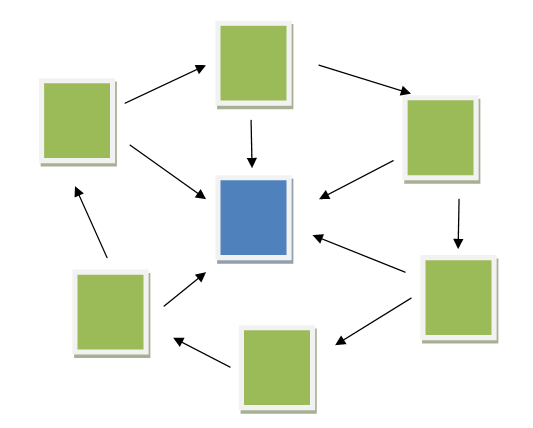
That is, in simple words, with the help of internal linking, we make it clear to the search engine which pages are important for promotion. Visually, you can see the relinking of your site, for example, in the Screaming Frog service visualization section.
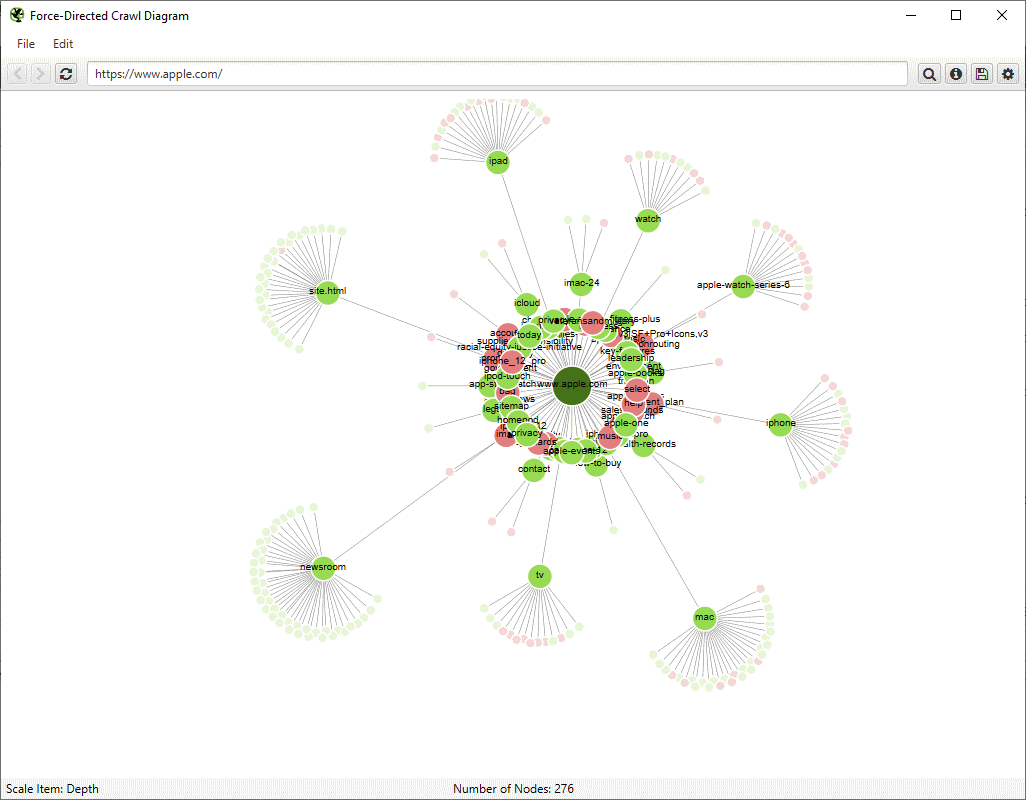
See the relinking of your site for example in the Screaming Frog service visualization. You can also see the internal relink of your site in the Google Search Console in the Links / Internal Links section.
SITEMAP AND ROBOTS
Robots.txt and Sitemap are basic files for SEO promotion, although their absence is not critical.
When a search engine crawls your site, it scans all the pages, all the links and all the content that is on the site. In fact, through the robots.txt file, we can prevent it from scanning pages that we do not want to promote, such as a page to crawl on the site, or feedback forms.
The robots.txt file must contain the following data:
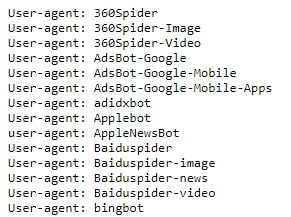
User-agent is a robot that we refer to, there is a really large list of them, but if we want to contact all bots at once, we just put *
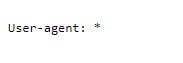
After that we can provide directories such as "Disallow" or "Allow". As the name implies in the "Disallow" directory, we forbid scanning pages, and for "Allow" we allow the opposite. Earlier we talked about banning crawling of the shopping cart page, form or site search, that's what it would look like in your robots.txt
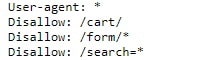
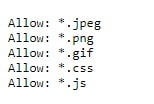
But if we want to allow for example indexing of all images, css or js files, regardless of where they are, we prescribe the following:
If your site has sitemap files, you need to specify their location in the "Sitemap:" directory.
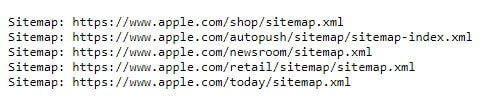
An example from the Apple website
What is a site map itself?
Sitemap is an xml file that contains all the pages of the site that we want to promote. They are presented in the following format where https://example.com/ is your site.
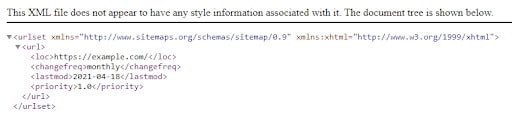
You can also generate a site map automatically, using Screaming Frog or using plugins of your SMS system.
UI UX IMPROVEMENTS
Isn't this a designer's job? Yes, but SEO is immeasurable, to achieve the goals set by the SEO specialist, you need to influence the design of the site, the placement of blocks, buttons and more. Very rarely, site owners are interested in increasing site traffic, because not every visit is targeted, or the site may not be promoted on relevant business keywords. To improve the behavioral factors on the site, AV testing is often conducted on the site based on the experience of specialists.
EXTERNAL LINKS
Off-page site optimization is an optimization that is related only to external factors, namely links from external resources to your site. There are several types of links: nofollow and dofollow. Nofollow links are most often links with the attribute rel = "nofollow", but also rel = "sponsored" and rel = "ugc", such links do not convey the specific weight of your site, ie such links do not affect the organic output of your site, but it does not mean that you don't need to develop nofollow links. Dofollow links are direct links mostly without attributes - such links convey the specific weight of your site and accordingly affect the organics of your site. The sites that link are actually donors to your site. The site that receives the link is called the acceptor. Not all donors are equally valuable to your site. With the help of paid services Ahrefs, MOZ you can determine the domain rating, traffic, trust, etc. This is one of the main factors in the selection of a donor, it is also equally important that the site from which the link will be on the subject related to the subject of your site. After placing a link, in an article or on any other page of the site, it is important that the page with the link is indexed by search engines, for this search in Google in the search bar type "site: https: //example.com/example-page/" where enter the exact URL of the linked page instead of an example.
BRANDING QUERY OPTIMIZATION FOR MULTILINGUAL SITES
Do you have a multilingual website? Will your brand name be the same regardless of language? For example, ISITLab, the brand name will be the same regardless of location, but when they search for ISITLab from Russia and get to the English-language page, they will not understand anything, and vice versa. So how do I target queries based on language? There are two ways, through the Google Search Console and sitemap.xml In GSC you need to go to Legacy tools and reports in the International targeting section. In my subjective opinion, the best way is through a sitemap. Let's return to the example of ISITLab.
<url>
<loc>https://isitlab.com/en<</loc>
<xhtml:link
rel="alternate"
hreflang="uk-ua"
href="https://isitlab.com/ua"/>
<xhtml:link
rel="alternate"
hreflang="en-us"
href="https://isitlab.com/en"/>
<xhtml:link
rel="alternate"
hreflang="ru-ua"
href="https://isitlab.com/ru"/>
</url>
You must specify a default URL in the <loc> tag, that is, if you speak a language other than the map provided by your site, and you specify the URL and language of the users in the <xhtml: link> tags.
IMAGE OPTIMIZATION
In addition to the pages of your site on the search network, you can and should promote images. This requires that these images were unique and relevant to your product. To promote images in addition to their presence, you need a sitemap according to Google's recommendations, or using Screaming Frog. Also for images should have a filled tag alt which should contain a description of the photo, try to tell everything you see in the photo.
VIDEO OPTIMIZATION ON THE SITE
Not the only YouTube. It is not necessary to create a YouTube channel and upload videos there in order for your videos to be successfully promoted on the search network. You can choose a video player that is convenient for you, even the aforementioned YouTube. Then create a sitemap specifically for the video, using all the recommendations from Google.
MICRO MARKUP ON THE SITE
Also on the site you can use micro-markup for example schema.org It is most often used in E-commerce niches to describe the product. Often due to the presence of schema on the site, the CTR increases, but if you fill in the markup incorrectly, you may have problems with the ranking of content on your page, you can check the correctness of the markup on the markup check service from Google.
INCREASE CTR
Since we have already talked about increasing the CTR, we will discuss ways to increase it.
- The best way is the first place in the issue if it does not sound trite, but for most high-frequency CTR keys in the first position may account for 80-90% of traffic;
- Relevant goal tags are also an extremely commonplace solution, but often SEO professionals forget about it, although it should be the default;
- Current data. I mean, if you have an article about Logistics Trends 2021, and in the yard 2053, your article will not be so relevant, but even if the trends themselves are relevant, the relevance of the year scares users from going to your site;
- CNC or clear URL. Without adequate URLs on the page, traffic will be less than you expect.
This basic, as written above, the presence of micro-markup increases CTR.
MINIFICATION OF CSS AND JS FILES.
This applies to the loading speed of the site. In most cases, minimizing CSS and js files helps browsers load the site page faster, but there are other factors that affect this speed. You can check the loading speed of your site with PageSpeed Insights, and with this tool, you will receive recommendations for optimizing the speed of your site.